Bill splitting scheme
To address the need for bill splitting when multiple projects share resources, and to meet the management precision, resource isolation, and compliance requirements in different scenarios, the platform provides a three-tier progressive bill splitting solution, namely sub-account dimension bill splitting , Workspace dimension bill splitting , Workspace API Key dimension bill splitting . Each solution has significant differences in accounting granularity, isolation capabilities, and configuration costs, and supports independent use or hierarchical combined deployment to adapt to the refined cost management needs of teams of different sizes.
Solution Overview
| Plan | Advantages | Disadvantages | Applicable Scenarios |
|---|---|---|---|
| Split accounts using sub-accounts | 1. High accuracy in cost statistics, enabling precise tracking of each resource call cost; 2. Linkage between bills and operation logs, facilitating audit and traceability; 3. Simple configuration, achievable solely through the account system | Resources lack visibility isolation, allowing all sub-accounts to view all resources, posing a risk of information leakage | 1. High requirements for cost accounting accuracy and strong demand for resource sharing among projects; 2. The team has unified resource management specifications; 3. Frequent cross-project resource scheduling is required |
| Split accounts by Workspace | 1. Complete isolation of resources (including viewing and invocation), preventing cross-project invocation; 2. Flexible billing statistics dimensions to meet multi-level management requirements; 3. Compliance with security protection regulations, reducing the risk of data leakage | The configuration process is complex, requiring completion of multiple steps such as creation, permission assignment, and resource deployment, and has high requirements for the professional capabilities of administrators | 1. Group enterprises, with each Line of Business / subsidiary independently accounted for, have high information sensitivity; 2. Projects have long cycles and large scales, with extremely high requirements for resource stability and security. |
| Split accounts by Workspace API Key | 1. The splitting granularity is finer, allowing for independent cost accounting by call key within a single Workspace; 2. There is no need to create a new Workspace, with flexible and efficient configuration, supporting the creation of multiple sets of keys on demand; 3. Keys are independently managed, can be separately distributed and revoked, and business risks are controllable | 1. Only splits the billing dimension, has no additional resource isolation capabilities, and shares all resources with keys under the same Workspace; 2. Depends on the Workspace system and cannot be used independently without a Workspace | 1. Under the same project, it is necessary to distinguish the call costs of different environments and different business systems; 2. It is necessary to distribute call keys to external partners and independently account for expenses; 3. Workspace isolation has been used, and further refinement of internal cost statistics is required |
1. Sub-account-based revenue sharing plan
Core Logic
Using sub-accounts as independent cost accounting units, configure independent sub-accounts for each project, team, or user. All resource invocation actions for a project are executed through the corresponding sub-account (including its associated AK). The system automatically records the operation trajectory of each sub-account and the corresponding resource consumption, and finally aggregates all invocation costs by sub-account dimension.
After downloading the monthly bill, you can filter by the loginName (sub-account login name) field in the bill, and combine it with the unblendedCost (original usage cost) to calculate the total cost of each sub-account.
Advantage Analysis
-
The cost statistics are highly accurate, capable of precisely tracking the cost of each resource call for every accounting entity, facilitating cost analysis and budget control;
-
The linkage between billing data and sub-account operation logs facilitates the audit department's tracing of the specific reasons for cost generation;
-
The configuration threshold is low, and sub-accounts only need to be created in the user management module to implement split payment, without the need for additional configuration of resource environments.
Disadvantages and Limitations
Only cost dimension splitting is performed, and resource visibility isolation is not implemented. After all sub-accounts log in to the Console, they can view all resource information within the system, posing a risk of information leakage.
Applicable Scenarios
-
Scenarios with high requirements for cost accounting accuracy but strong demand for resource sharing among projects;
-
The team has a unified resource management specification, and sub-account users have good operational discipline;
-
Scenarios where frequent cross-project resource scheduling is required and where users do not want work efficiency to be affected by isolation settings.
Operation Guide
1. Log in to the Console with the primary account. Please refer to the Create Sub-account page to complete the configuration of multiple sub-accounts.
2. Access the Monthly Bill Page , and download the bill to your local device. In the downloaded bill spreadsheet, the "unblendedCost" column represents the original cost of usage (excluding discounts and taxes), the "loginName" column contains the login names of sub-accounts, and you can filter and calculate the total cost of each sub-account based on the "loginName" column.

2. Workspace-based Revenue Sharing Scheme
Core Logic
Taking Workspace as an independent accounting unit, each Line of Business and independent project corresponds to a dedicated Workspace, with resources independently deployed and call boundaries strictly closed; the primary account assigns access rights to the corresponding Workspace for sub-accounts through permission configuration, and sub-accounts can only operate resources within the authorized scope.
All resource usage fees generated within a Workspace are uniformly aggregated to the corresponding Workspace dimension. After downloading the monthly bill, you can filter and calculate the total fees for each Workspace through the workspaceName field. Regardless of the account ownership of the usage, the fees are attributed to the Workspace where the resources are located.
Advantage Analysis
-
Achieve complete isolation of resources, covering all dimensions such as resource viewing, log querying, and service invocation, and eliminate the possibility of cross-project resource invocation from the underlying architecture;
-
The bill statistics dimension is flexible, allowing users to view the overall project costs by Workspace and analyze the costs incurred by specific operations by sub-account, meeting the management needs of different levels;
-
It meets the requirements of information security classification protection compliance, and for projects involving sensitive data, it can reduce the risk of data leakage through strict isolation settings.
Disadvantages and Limitations
The configuration process is complex, requiring the primary account to complete operations in multiple stages such as Workspace creation, sub-account configuration, permission assignment, and resource deployment, which places high demands on the administrator's professional capabilities.
Applicable Scenarios
-
Group enterprises, with each line of business or subsidiary under them as an independent accounting unit, have high information sensitivity among projects;
-
Projects with long cycles and large scales have extremely high requirements for resource stability and security, and do not allow scenarios where potential risks may arise from resource sharing.
Operation Guide
1. To log in to the Console with the primary account, please refer to the Workspace Management page to complete the configuration of multiple workspaces, as well as the authorization of sub-accounts and workspaces.
2. Visit the Monthly Bill Page , refer to the figure below, and you can see information on multiple workspaces by scrolling down. This page only displays the list of workspaces that incurred costs during this period. Therefore, if you find that the actual number of workspaces displayed is less than the number you configured, it may be because the workspaces did not incur any usage during this period. The platform supports single or multiple selection to aggregate and calculate the costs of each workspace.

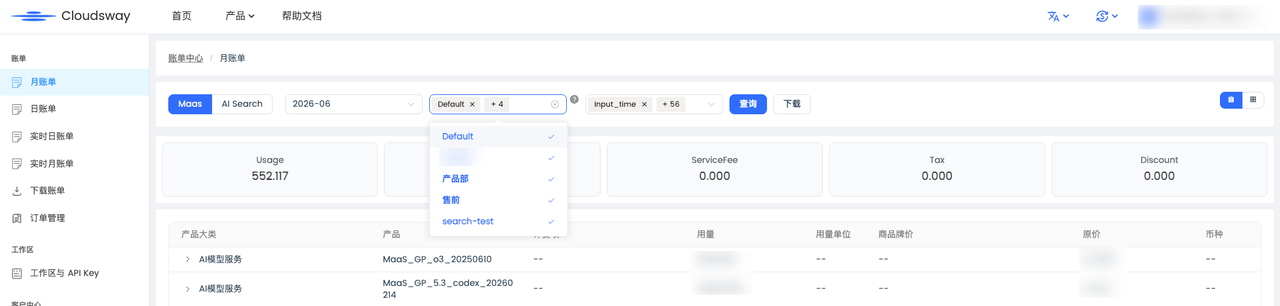
3. Download the bill to the local device. In the downloaded bill spreadsheet, the "unblendedCost" column represents the original cost of usage (excluding discounts and taxes), the "workspaceName" column represents the workspace name, and you can filter and calculate the total cost of each sub-account based on the "workspaceName" column.

3. Fine-grained Billing Scheme Based on Workspace API Key
Core Logic
This solution is a downward extension of the Workspace dimension billing, with a single set of API keys within the Workspace serving as an independent cost accounting unit. Without creating new Workspaces, dedicated API keys are created for different business systems, operating environments, and partners within the Workspace; all resource call costs incurred through these keys are separately aggregated under the corresponding API keys, enabling refined cost breakdown within the Workspace.
After downloading the bill, you can filter by the API Key identification field in the bill and calculate the call fees corresponding to each group of keys.
Advantage Analysis
-
More refined revenue sharing granularity : Based on project accounting at the Workspace level, it can be further broken down to individual sets of call keys, accurately pinpointing the resource consumption of each caller and each business scenario, thus meeting the requirements for refined cost control and allocation;
-
Flexible and efficient configuration : There is no need to create multiple Workspaces. Multiple sets of API Keys can be created on demand within the existing Workspace, with low management costs, and can quickly adapt to business iterations and the billing requirements of new callers;
-
Independent and Controllable Keys: Each group of API Keys is independently managed, independently effective, can be separately distributed externally, and revoked at any time, without affecting the normal operation of other keys and business within the Workspace, ensuring controllable risks in external cooperation scenarios.
Disadvantages and Limitations
-
Only implements the segmentation at the bill dimension, without additional resource isolation capabilities. All API Keys under the same Workspace share all resources within that Workspace, and it is not possible to restrict the resource access scope of a single key;
-
It is attached to the Workspace system and cannot be used independently without the Workspace. The boundary of revenue sharing does not exceed the resource scope of the Workspace to which it belongs.
Applicable Scenarios
-
Within the same project Workspace, it is necessary to distinguish the call costs of different operating environments such as development, testing, and production;
-
Multiple internal business systems share the same Workspace resource, but each needs to independently account for its own expenses;
-
Call keys need to be distributed to external partners and third-party service providers, and their call costs need to be separately counted;
-
Workspace has been adopted for project-level isolation, and at the same time, more fine-grained cost breakdown within the project is required.
4. Selection and Combined Usage Recommendations
The three types of solutions are not mutually exclusive, but rather progressive and complementary in terms of accounting granularity from coarse to fine, and can be deployed in a hierarchical and combined manner according to business management requirements:
-
Lightweight team scenario : Only need to calculate the cost by personnel/team, frequent resource sharing between projects, it is recommended to use sub-account dimension accounting separately to achieve cost splitting with the lowest configuration cost.
-
Strong Compliance Business Scenario: With strict requirements for data isolation and compliance auditing, independent accounting by Line of Business, recommended to useWorkspace-level Billing, along with sub-accounts for permission management, to achieve dual isolation of resources and bills.
-
Refined Management Scenario: A Workspace isolation system has been deployed, and at the same time, it is necessary to distinguish the costs of multiple internal systems, multiple environments, and multiple partners. It is recommended to overlay API Key-level cost sharing on the basis of Workspace to improve the accuracy of cost accounting without increasing management complexity.
-
Complex enterprise scenarios: A three-tier solution can be used in combination: isolate core Lines of Business through Workspace to ensure security compliance, control personnel operation permissions through sub-accounts, and achieve fine-grained cost breakdown for multiple entities within Workspace through API Key, adapting to the multi-level management needs of group enterprises.